Unlock icloud Tool Fake iOS V15.0 Free Of Cost All Users
- Icloud Unlock Deluxe software, free download For Pc
- Icloud Unlock Deluxe Torrent Download
- Icloud Unlock Deluxe software, free download For Pc Latest
Hello friends, today we will share with you Unlock icloud Tool Fake iOS V15.0 Free Of Cost All Users This tool is the best tool to unlock icloud of iphone and ipad, to unlock icloud with this tool, you must first jailbreak your iphone. After that you can unlock icloud of iphone and ipad with this tool
Features
Unlock iCloud Lock If you are stuck with a iCloud Activation Locked and/or Blacklisted Apple Device the iCloud Unlock Deluxe Software is the best solution to. Tag: icloud unlock deluxe software download. Doulci4.1.2 Download For Bypass iCloud iOS 12.2. Click on the iCloud Unlock Deluxe download link and install it on your computer. Once the download is complete, right-click on the software icon and select “ Run as Administrator ”. An iCloud Unlock Deluxe Setup window will open. To proceed click on the “ Next ” button. How To Download The Software For Free iCloud unlock by imei free with this method is very easy, the process is done online, and without password.The iN Box iCloud 2021 software can be run from Windows, Mac or Linux computers, in any of its versions, apart from the tool you need a usb cable. FREE DOWNLOAD NOW. ICloud Unlock Tool download free 2021 is performed using a virtual server, and you can install it on a PC with MacOS, Windows 10/8/7 or Linux (Ubuntu). Being an easy to use software, that works on all iPhone and iPad models and is also a service, make this method the best unlock Deluxe that you can find in this 2021. Use a compatible lightning cable to connect your iPhone to your PC. On LockWiper, click on Unlock Apple ID mode. It will be displayed on the home screen of the software. Now click on Start to Unlock button on the next screen. IMyFone LockWiper will start the unlocking process.
(Start fake ios)
- In this option, you can start the tool for performing the various tasks you need to
(Check ICCID Latest NEW)
- Every SIM card has an ICCID number, which stands for Integrated Circuit Card Identifier and consists of 19 to 20 characters. Note: To ensure your device works properly, please verify the correct SIM card is being used by matching the ICCID number associated with your device IMEI.
(Back Originals)
- You can perform this task and back to the original ICCID on your iPhone and iPad Device with a single click only
(Check Connected)
- In this option, you can check the device is connected properly to your computer with a 1 click.
README important
Compatibility– The tool runs perfectly on Windows XP, Windows Vista, Windows 7, Windows 8, Windows 8.1, and Windows 10 (32 bit and 64 bit).
Take a Backup – If you are willing to try the above tool, then please take a backup of your personal data from your Android Smartphone or Tablet. As flashing any Firmware or recovery may brick the device.
Credits Unlock icloud Tool Fake iOS V15.0 Tool is created and distributed by the developer. So, full credits go to the developer 4 sharing the tool for free…
In the world of iPhones, where the most recent models are among the most expensive mobile phones available, it is often the more affordable option to purchase a second-hand model.
However, occasionally this budget-friendly solution comes with a bit of a conundrum – the previous owner forgot to take their personal account off the phone and now it’s iCloud-locked.
You’d be forgiven for thinking that this is a simple matter to resolve, but the truth is it’s not.
The iCloud account is a very clever and welcome development when it comes to stolen iPhones, as the iCloud account limits the phone’s capabilities and functionalities for anyone other than the person linked to the specific account.
Unfortunately, sometimes second-hand phones in honest hands will also face this problem – so, how do you fix the issue?
Luckily the answer to that question is actually pretty simple: iCloud Unlock Deluxe. It is a program specifically built to remove unwanted iCloud accounts from second-hand iPhones.
Free iCloud Unlock Deluxe Download
The official download process of the iCloud Unlock Deluxe can be tedious. Not only is it difficult to find, but there are also a number of hurdles that block access to the software for users.
In order to start the download process, the user needs to complete a lengthy survey. Be aware that the survey often doesn’t register upon completion, which means that you will have to fill it out a second time.
The official download also requests a payment after the survey which needs to be made before the download can commence.
Many users reported that even after they’d completed the survey and made the payment, they still did not receive the download.
These difficulties suggest that users should steer clear of the MacCrunch iCloud Unlock Deluxe.
But, if you are unconvinced and still want to try it this way, leave your email address in the comment section and we’ll forward the link where you can get the iCloud Unlock Deluxe (3MB) free of charge.
Update
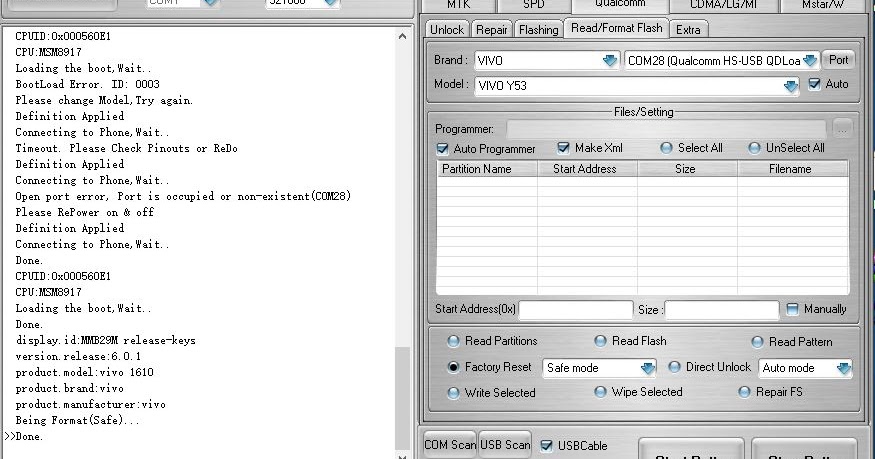
We have received notice that the link to download the iCloud Unlock Deluxe free version is faulty. We can no longer send it on.
If you are still interested in iCloud removal, opt for one of the alternative methods that actually work.

Reviewing iCloud Unlock Deluxe
The iCloud Unlock Deluxe download was designed to assist users in removing unwanted iCloud accounts from iPhones and thereby removing the iCloud lock.
Once removed, users can log into their own iCloud accounts and enjoy the full functionality of their device including the Find my iPhone and other security features.
But, is it a workable solution and is it reliable?
Functionality and Reliability
In order to determine whether or not this solution works, we ran a trial on an iPhone X (iOS 12.1.4) and an iPhone 6 (iOS 11.3). It failed to work on both devices and could not remove the lock on either.
Our conclusion here is that this solution is in the same wheelhouse as the Unlock Mtool 2019 and the iBoxTool 2019, and that it isn’t reliable and won’t work for the majority of users.
Bear in mind that you are still welcome to test the functionality of the solution on your device if you have a model other than the iPhone X (iOS 12.1.4) or the iPhone 6 (iOS 11.3).
How it works
Once you have completed the download, you should right-click on the download and click on “Run as administrator” in order for the installation to work.
It can be a little complicated to use the iCloud unlock solution, but this is how you do it.
Step 1: Download and install the software on a computer. Please note that we are no longer sending the link to the iCloud Unlock Deluxe download to our readers.
Step 2: Connect your iPhone to your computer using a USB lightning cable.
Step 3: Run the iCloud Unlock Deluxe program.
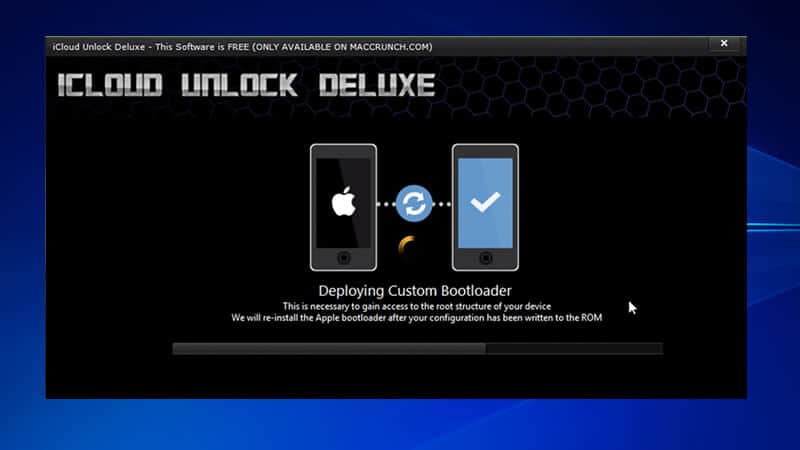
Step 4: Your device should restart with a custom bootloader offering unlimited access for the unlock process.
Step 5: As soon as your iPhone info is displayed, check the corresponding box.
Step 6: Select “Continue with Unlock Procedure”
Icloud Unlock Deluxe software, free download For Pc
In this step, you will have a range of options to choose from:
- Refresh Serial Number (it successfully wipes your serial number off the Apple servers, but also voids any warranties and Apple Care you have.)
- Allocate new IMEI (this unlocks the SIM)
- Renew IMSI to match IMEI (this unlocks the SIM)
- Custom Setup.ipa (this option will remove iCloud permanently which means that the device in question will never be able to be iCloud-locked again even if it’s reset or updated).
- Block Apple ID Verification Servers (this option removes the activation lock enforced by iCloud, however it also wipes any iCloud features which means that iCloud notes, contacts, photos etc. will be removed and unavailable).
Step 7: Depending on your device, choose one of the above options to initialize the unlock process.
Step 8: Wait while the unlock process is active – your device will restart multiple times.
Upon installation of the firmware, your device details will be displayed once more. If the process was successful, your lock status should read “Clean”.
Frequently Asked Questions
How can I get the iCloud Unlock Deluxe link from you?
In the past we provided the link to readers upon request but unfortunately not a single one of those download attempts were successful.
For this reason, we are not sending the link to any readers anymore and that is why you won’t be able to get it from us.
Is the iCloud Unlock Deluxe available on a different website?
In this regard, we’ve done the research for you and found that there are basically no websites that are able to provide readers with a functional installation link.
In most cases, self-proclaimed experts will ask you to merely subscribe to their YouTube channel after which they will request your personal information.
Once received, you will be required to install an endless series of files which will turn out to be cryptoviral attacks until you are left with nothing but a computer riddled with malware.
Useful Alternative Options
Due to the difficulty of finding a proper version of the iCloud Unlock Deluxe download and then trying to successfully install it – we’ve rounded up a couple alternative options that actually work and are simpler to either find or use.
Each of these alternatives will assist you in successfully removing an Apple ID from an iPhone without the need for a password.
We trialled each alternative on an iPhone X, and iPhone 6 and an iPhone 11 Pro Max and all attempts were successful. That is why we recommend these as workarounds to the troubles posed by the iCloud Unlock Deluxe.
AppleiPhoneUnlock
As a first option, we highly recommend the AppleiPhoneUnlock.
This is an iCloud unlocking tool which doesn’t require any effort on your part. This means that after you place your order and submit your details, an expert will complete the process on your behalf.
Benefits of the AppleiPhoneUnlock solution:
- Unlocks any account in 1 – 3 days
- Works on any device including iOS/iPadOS/watchOS
- Compatible with all iPhone models
- Permanent unlock meaning the device will never be able to be iCloud-locked again
- Money-back guarantee if unsuccessful
Once you place an order for AppleiPhoneUnlock, their team of professionals will unlock the iCloud account on your device remotely. You don’t have to do anything so no tech knowledge or skills is necessary!
How to use AppleiPhoneUnlock:
- Check your iPhone’s iCloud status using an accurate IMEI checker. This service will not work if the phone has been blacklisted.
- Visit the AppleiPhoneUnlock page for the iCloud unlock service.
- In the drop-down menu, choose your device model and submit your IMEI.
- Select “Unlock Now”
- Submit your payment information.

Once you’ve made the payment, they will start to process your order and in 1 – 3 days the unwanted iCloud account will have been removed and you will be able to sign in with your own!
How to find your IMEI number
If you want to go this route, you will need to submit the IMEI number of your device.
In order to find your number, click on the i-button indicating information on the Activation Lock screen. Three numbers will be displayed, the IMEI among them.
However, if you have an iPhone model older than the iPhone 6S, your IMEI will be engraved on the back of your device or it will be displayed on the SIM tray.
Tenorshare 4uKey
The Tenorshare 4uKey is a software tool, so this option is dependent on access to a computer.
Benefits of Tenorshare 4uKey
- Works with iOS 11.4 and earlier models
- Offers a free trial so you can try before you buy
- Unlocks iCloud accounts and removes iPhone passcodes within minutes
- Dependent on the iOS version of your device, personal data will not be lost
This program offers multiple fantastic features, which makes it a great alternative to the iCloud Unlock Deluxe.
How to use Tenorshare 4uKeyDownload and install the Tenorshare 4uKey program using a computer
Launch the program
Icloud Unlock Deluxe Torrent Download
On the main menu screen, click on “Unlock Apple ID” as your preferred unlock mode
Connect your iPhone to the computer using a USB lightning cable
Click on the “Start” button to initialize the iCloud account removal process
If the Find My iPhone feature is disabled, then you can complete the process without any other steps. If you have the Find My iPhone feature enabled, you will need to follow the next steps of the process.
- Open Settings > General > Reset
- Click on “Reset all Settings”
- Enter the passcode for your device
- Success! Your Apple ID will be removed after only a few minutes.
Once completed, you will be able to sign into your personal iCloud account and enjoy full functionality of your device again.
The Verdict

We know that for the majority of people, using the iCloud Unlock Deluxe is too cumbersome and that it often fails due to problems or false promises from self-proclaimed experts.
That is why we recommend Tenorshare 4uKey or AppleiPhoneUnlock as good alternatives for anyone wanting to remove the iCloud lock from their device.
Icloud Unlock Deluxe software, free download For Pc Latest
Either of these solutions would be a better choice than the iCloud Unlock Deluxe solution because both are easy, simple to use, affordable and reliable – but most importantly, both these solutions really work.